# Colophon
How this blog is hosted (100% Claude) - a Raspberry Pi, a Cloudflare Tunnel, and no monthly bill.

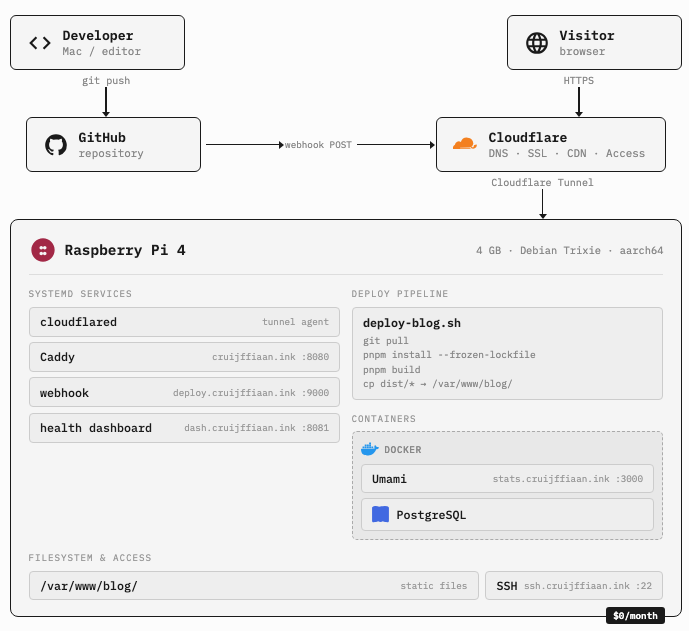
This page describes how the blog works, from the hardware to the deploy pipeline. It was pretty much written by Claude, the same AI that helped build the infrastructure it describes. You can toggle x-ray mode above to see that reflected in the text.
## The hardware
The website runs on a Raspberry Pi 4 with 4GB of RAM and a 64GB SD card. It sits on my desk at home, connected to the Wi-Fi.
## The stack
The blog is built with Astro 5 and MDX. Posts are markdown files in a git repository. There’s no database and no CMS. Content management is a text editor and `git push`.
On the Pi:
- **Caddy** serves the static build output on port 8080. It handles gzip, caching headers, and security headers. TLS happens elsewhere.
- **cloudflared** maintains a persistent outbound connection to Cloudflare’s edge. This is the Tunnel agent. It makes the Pi reachable from the internet without opening any ports on the router.
- **Cloudflare** handles DNS, SSL termination, and caching for free. The domain
`cruijffiaan.ink`is registered through Cloudflare Registrar at yearly cost of $19.
The home IP is never exposed and there are no open ports on the router. From the outside, the blog looks like it’s hosted on Cloudflare. From the inside, it’s a $35 computer on Wi-Fi.
## The deploy pipeline
When I push to `main`, the blog rebuilds itself:
`git push origin main`hits GitHub- Github sends a webhook POST to
`deploy.cruijffiaan.ink` - A webhook listener on the Pi verifies the HMAC-SHA256 signature
- If valid, it runs a deploy script: pull the latest code, install dependencies, build, copy the output to the web root
- Caddy picks up the new files immediately, no restart needed
The whole process takes like less than 5 seconds. Most of that is the `pnpm build` compiling the Astro site on an ARM processor.
## Analytics
Being an ex-Data Scientist, I’m quite curious to see if people actually visit this blog and what they end up reading.
The blog uses Umami, a self-hosted analytics platform. It runs in Docker on the
same Pi alongside a PostgreSQL database. The dashboard lives at
`stats.cruijffiaan.ink`. It’s protected behind Cloudflare Access, so you need to
log in with my permission to see it.
Umami doesn’t set cookies, doesn’t collect personal data, and doesn’t track across sites. It just tells me how many people visited, which pages they read, and where the traffic came from. That’s enough.
## Monitoring
A health check script runs every minute via cron. It pokes at systemd services, Docker containers, local and external HTTP endpoints, DNS, SSL expiry, and my “homeberry” Raspberry Pi’s CPU temperature, memory, and disk. The results get written as JSON and served by a static dashboard at `dash.cruijffiaan.ink`, also behind Cloudflare Access.
## Remote Access
SSH to the Pi works from any network through the Cloudflare Tunnel. The connection goes through `ssh.cruijffiaan.ink`, which proxies through Cloudflare to the Pi’s SSH server on port 22.
## What it costs
| | Item | | Cost | |
|---|---|
| | --- | | --- | |
| | Domain | | ~$19/year | |
| | Cloudflare (tunnel, DNS, SSL, caching, Access) | | Free | |
| | Raspberry Pi hardware | | ~$70 one-time | |
| | Electricity | | ~$5/year | |
| | **Monthly hosting cost** | | **$0** | |
The recurring cost is the domain and electricity. Everything else is either free or already paid for.
## Why self-host
Not too deep - I just like the idea of running this on hardware that I own. It’s a bit of a hobby project for me, and I find it very satisfying to have a physical machine running the blog. Plus, it’s a fun challenge to set up and maintain the infrastructure (with Codex and Claude). I also like the idea of a blog that’s not dependent on any third-party platform or service. It’s just me, a Raspberry Pi, and the internet.